AI Food Photography
Turn a quick snapshot of a dish into an appetizing, professional-looking food photo for your menu, delivery app or social posts.
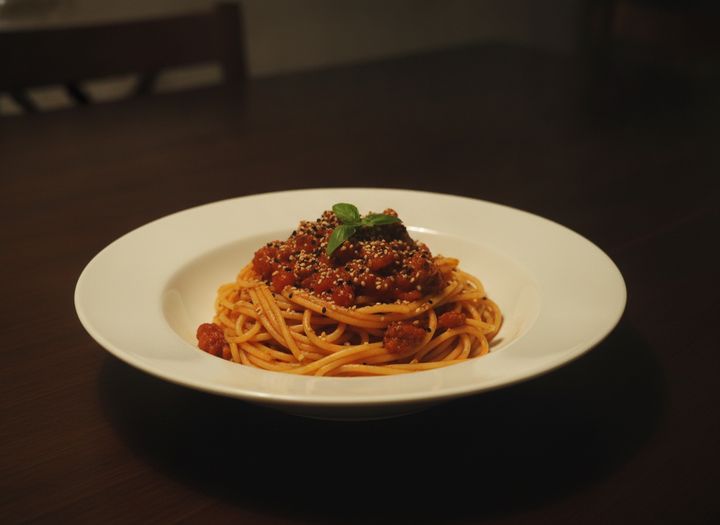
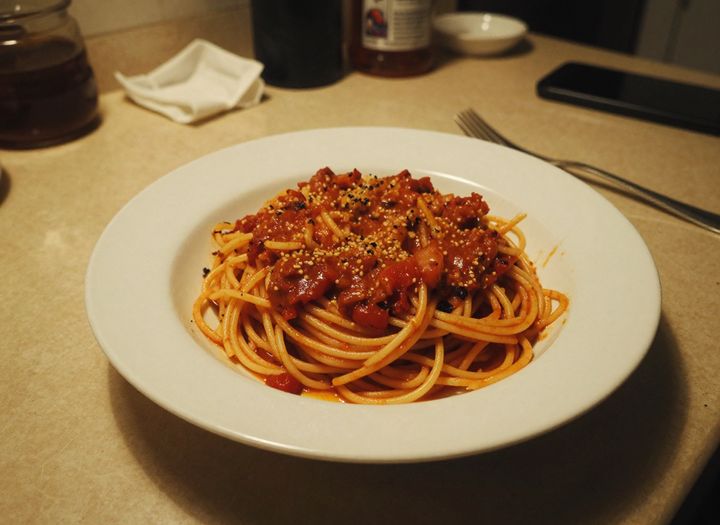 BeforeAfter
How to make food photos with AI
- 1
Upload a photo of your dish, even a quick phone snapshot.
- 2
Pick a look and, if you like, add extra instructions.
- 3
Download the food photo for your menu, delivery listing or post.
Professional food photos from a phone snapshot
AI food photography turns the photo you took in the kitchen or at the table into an image that makes people hungry. Upload a snapshot of a dish, pick a look, and the AI restyles the shot with better plating, lighting and composition: an elegant restaurant plate on a dark, moody background, an overhead flat lay, a rustic wooden setting or a bright and airy style. It is instructed to keep the same dish and its ingredients, so the photo still shows what customers will get. Use the results for restaurant menus, delivery app listings, food blogs and social media. Compare each result with the real dish before you publish it.
What this AI food photo tool does well
Four looks for different menus
Restaurant for elegant plating on a dark background, overhead for flat lays and shared plates, rustic for home cooking and baking, and bright and airy for cafes, salads and desserts.
Lighting that makes food look fresh
Dim, yellow kitchen light is replaced with soft, directional light that brings out texture, steam, the gloss on sauces and the color of fresh ingredients.
The same dish, better presented
The tool is instructed to keep your dish and its ingredients and to improve the plating, light and setting around it, so the photo stays honest to what you serve.
Add props with a sentence
Use the optional instructions to add details like fresh herbs, a drink, cutlery or a linen napkin, while the dish and the look you picked stay the same.
Who uses AI food photography
Restaurants and cafes
Refresh menu photos, table cards and window posters with consistent, appetizing images of the dishes you actually serve, without booking a food photographer.
Delivery app listings
Give every item on Uber Eats, DoorDash or other delivery apps a clear, well-lit photo, so customers can see what each dish looks like before they order.
Food bloggers and home cooks
Make recipe posts, blog headers and social media photos look polished, even when you cooked at night in a small kitchen with poor light.
Bakeries and packaged food
Show cakes, bread, snacks and meal kits in a rustic or bright setting for online shops, ordering pages and seasonal promotions.
Tips for better AI food photography
Photograph the dish while it is fresh and untouched, with the whole plate in the frame. A half-eaten plate or a cropped edge gives the AI less to work with.
Choose overhead for pizzas, bowls, platters and shared tables. Burgers, layered cakes and drinks usually look better in the restaurant or bright look, which shows their height.
Keep extra instructions to one or two props, such as “a lemon wedge on the side”. Too many items crowd the plate and draw attention away from the food.
Use the same look for every item on one menu or delivery listing, so the photos feel like a matching set rather than pictures from different places.
Simple, credit-based pricing
Every tool runs on the same credits. One image is 30 credits, and failed generations are refunded.
Starter
For occasional photos
- About 75 images per month
- 2,250 credits
- All 34 AI image tools
- Commercial use
- Failed generations refunded
Plus
For busy shops and creators
- About 150 images per month
- 4,500 credits
- All 34 AI image tools
- Commercial use
- Failed generations refunded
- Priority support
Business
For teams, agencies and high volume
- About 300 images per month
- 9,000 credits
- All 34 AI image tools
- Commercial use
- Failed generations refunded
- Dedicated support
Monthly and yearly plans renew automatically at the end of each period until you cancel, and you can cancel anytime in Settings. Credit packs are one-time purchases that never renew; their credits last 1 year. Prices include tax.
AI food photography FAQ
- Will the AI change my dish?
- The tool is instructed to keep the same dish and its ingredients, and to improve the plating, light and setting. AI can still change small details, so compare the result with the real dish before you publish it.
- Can I use these photos on a menu or a delivery app?
- Yes, results can be used commercially, subject to our terms. Delivery apps and some local rules expect photos to represent the food accurately, so only use images that match what customers will receive.
- What photo should I upload?
- A sharp photo of one dish, taken from a natural angle with the whole plate visible. Daylight helps, but a dim or slightly messy snapshot is fine, because the lighting and setting are redrawn.
- What is the difference between the four looks?
- Restaurant gives an elegantly plated dish on a dark, moody background, overhead shows the food from directly above, rustic uses wood and linen in window light, and bright and airy uses white marble and soft daylight.
- Does the overhead look change the camera angle?
- Yes, it redraws the dish as seen from above. This works best with pizzas, bowls, salads and platters. Tall food like burgers or layered cakes may look less like the original from above, so check the result or try another look.
- Can I add props, drinks or a different table?
- Yes. Type extra instructions such as “add a glass of white wine” or “dark slate table”. The look you picked still applies, and the tool is told to keep the dish itself unchanged.
- Can it make portions look bigger or add toppings?
- You can ask for a garnish, but avoid instructions that make a portion bigger or add ingredients the dish doesn't have. Photos that oversell the food lead to complaints and may break delivery app rules.
- How much does it cost, and how is my photo handled?
- Each image costs 30 credits, and failed generations are refunded automatically. Images are made with Google's Nano Banana model through its API, results are saved in My Images, and uploads are deleted from the processing service within 24 hours.
More AI tools
All tools
AI Image Generator
Describe what you want, choose a model, and turn your text into a 1K image.
Image to Image
Upload one to four images, describe what you want, and get a new 1K image built from them.

AI ID Photo Maker
Turn one photo of yourself into a formal, front-facing ID-style photo on a white, blue or red background.

AI Product Photo
Turn a simple product snapshot into a studio-quality photo for your store.

AI Headshot Generator
Get a professional headshot for LinkedIn or your resume from one selfie. No photographer needed.

Old Photo Restoration
Remove scratches and fading, sharpen faces and add natural color to black-and-white photos.

AI Background Changer
Upload a photo, pick a new background or describe your own, and the subject is kept as it is.
AI Object Remover
Type what you want gone, like a stranger or a trash can, and the AI removes it and fills in the background.
White Background Maker
Upload a product snapshot and get it back on a clean, plain background with a soft shadow, ready for your store.